R.version.string1 Installation
In this section, the aim is to have everyone set up with R, RStudio, Quarto, and LaTeX (using TinyTeX), which Quarto needs to make PDFs.
1.1 Overview
- Duration 15 minutes
1.2 Questions
- How do I install R?
- How do I install Quarto?
- How do I install LaTeX in a sane way?
- How do I download the exercises?
1.3 Software Setup
1.3.1 R
We recommend R 4.5.0 or later. You can check which version you have with:
You can download R here:
1.3.2 RStudio
1.3.3 Quarto
1.4 Checking you are up to date
To ensure you are up to date, run the following script to install the packages.
install.packages(c(
  "broom",
  "fs",
  "here",
  "knitr",
  "naniar",
  "quarto",
  "rmarkdown",
  "skimr",
  "spelling",
  "tidyverse",
  "tinytex",
  "usethis",
  "visdat"
))
1.5 A note on PDF
Quarto documents can be compiled to PDF, which is a great feature. In order to convert the documents to PDF, they use a software called LaTeX (pronounced la-tek or lay-tek).
You need to install LaTeX yourself. Quarto doesn’t come with it. I recommend that you use TinyTeX, the steps are below.
Once TinyTeX is installed, Quarto takes care of the rest. Its built-in LaTeX engine runs LaTeX for you, and installs any missing LaTeX packages as it goes.
1.5.1 Installing TinyTeX
Installing LaTeX can be a pain, but thankfully Yihui Xie has put a lot of time and energy into making an easier way to install it - tinytex. tinytex is an R package that installs a sane, lightweight (<200Mb) version of LaTeX.
To install TinyTeX, run the following in R. It takes a few minutes:
tinytex::install_tinytex()If you get the following error, this is good! As it means that TeX has already been installed:
Error: Detected an existing tlmgr at /usr/local/bin/tlmgr. It seems TeX Live has been installed (check tinytex::tinytex_root()). You have to uninstall it, or use install_tinytex(force = TRUE) if you are sure TinyTeX can override it (e.g., you are a PATH expert or installed TinyTeX previously).Alternatively, you can run the following from the terminal
quarto install tinytex
# follow the prompts from here
1.5.2 Problem solving with LaTeX
If you have any problems with installing tinytex, I recommend you check out the tinytex FAQ page.
1.6 Test Script
You should be able to run the following code on your machine
library(broom)
library(fs)
library(here)
library(knitr)
library(naniar)
library(quarto)
library(rmarkdown)
library(skimr)
library(spelling)
library(tidyverse)
library(tinytex)
library(usethis)
library(visdat)
1.7 Downloading the exercises
The exercises and data for the course live in their own repository, qmd4sci-exercises. This code from usethis will automagically download them, and open up an RStudio project. We will talk more about those later.
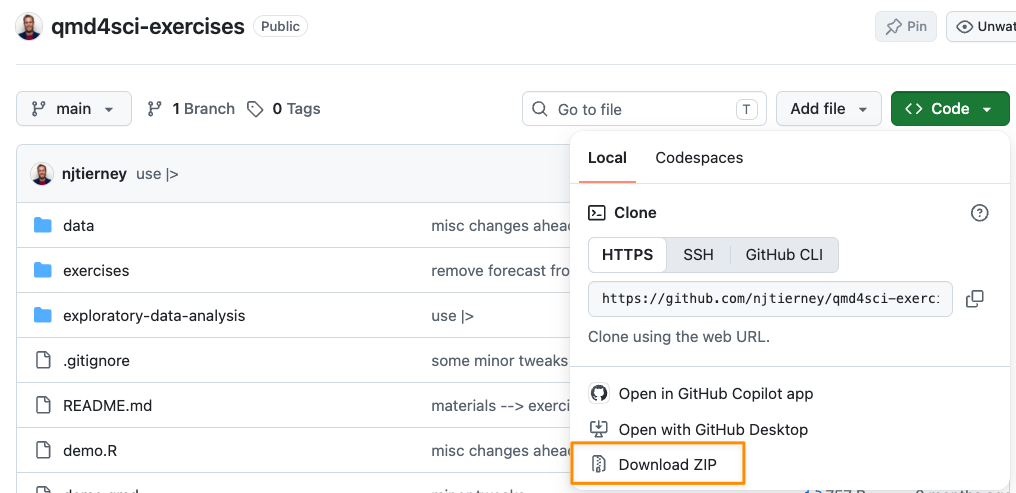
usethis::use_course("njtierney/qmd4sci-exercises")If this doesn’t work on your machine, the same files are in this zip - clicking this link should download it for you: https://github.com/njtierney/qmd4sci-exercises/archive/refs/heads/main.zip
Alternatively you can go to https://github.com/njtierney/qmd4sci-exercises and download them there by navigating to the “Download Zip” link - see below for a screenshot: